For example, I have 2 files: plik1.txt and plik2.txt: ISO 8859-2
plik1.txt opens as OEM - Latin II
plik2.txt opens as ANSI
I'd like to run both from Toolbar
"Open 2 x txt" Call("Scripts::Main", 1, "EvalCmd.js", `0x1; AkelPad.OpenFile("D:\Work\plik1.txt"); AkelPad.OpenFile("D:\Work\plik2.txt"); `) Icon("")
What command to type to make both open in: ISO 8859-2?
Coding
- Author
- Message
-
Offline
- Posts: 1348
- Joined: Thu Nov 16, 2006 11:53 am
- Location: Kyiv, Ukraine
Re: Coding
According to "AkelPad\AkelFiles\Docs\Scripts-Eng.txt" :
You can specify 0x03 as the value of nFlags.
And specify the desired encoding as the value of nCodePage.
For example:
Code: Select all
OpenFile(pFile[, nFlags][, nCodePage][, bBOM]);And specify the desired encoding as the value of nCodePage.
For example:
Code: Select all
AkelPad.OpenFile("D:\\Work\\plik1.txt", 0x03, 28592);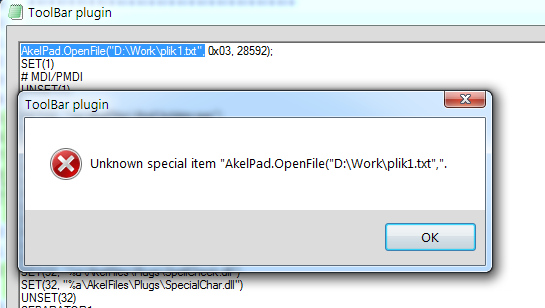
-
Offline
- Posts: 1348
- Joined: Thu Nov 16, 2006 11:53 am
- Location: Kyiv, Ukraine
This works for me:
Code: Select all
"Open txt" Call("Scripts::Main", 1, "EvalCmd.js", `AkelPad.OpenFile("AkelFiles\\Docs\\Toolbar-Eng.txt", 0x01, 28592);`) Icon("") -
Offline
- Posts: 1348
- Joined: Thu Nov 16, 2006 11:53 am
- Location: Kyiv, Ukraine
As for Toolbar's own commands, the "AkelFiles\Docs\Toolbar-Eng.txt" says:
So it is just "OpenFile" for Toolbar, instead of "AkelPad.OpenFile" for Scripts, and the codepage is 2nd parameter for Toolbar, instead of 3rd parameter for Scripts.
Code: Select all
OpenFile("file"[, OpenCodepage][, OpenBOM])-
Offline
- Posts: 294
- Joined: Thu Sep 10, 2015 9:53 am
- Location: Deutschland
-
Offline
- Posts: 874
- Joined: Sat Jan 16, 2010 2:03 pm
-
Offline
- Posts: 294
- Joined: Thu Sep 10, 2015 9:53 am
- Location: Deutschland
I tried like this:
"Open txt" Call("Scripts::Main", 1, "EvalCmd.js", `AkelPad.OpenFile("D:\\plik1.txt", 0x01, 28592); `AkelPad.OpenFile("D:\\plik2.txt", 0x01, 28592);`) Icon("")
and this way:
"Open txt" Call("Scripts::Main", 1, "EvalCmd.js", `AkelPad.OpenFile("D:\\plik1.txt", 0x01, 28592);` `AkelPad.OpenFile("D:\\plik2.txt", 0x01, 28592);`) Icon("")
this information appears:
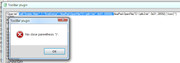
the number of parentheses is even, so... why?
"Open txt" Call("Scripts::Main", 1, "EvalCmd.js", `AkelPad.OpenFile("D:\\plik1.txt", 0x01, 28592); `AkelPad.OpenFile("D:\\plik2.txt", 0x01, 28592);`) Icon("")
and this way:
"Open txt" Call("Scripts::Main", 1, "EvalCmd.js", `AkelPad.OpenFile("D:\\plik1.txt", 0x01, 28592);` `AkelPad.OpenFile("D:\\plik2.txt", 0x01, 28592);`) Icon("")
this information appears:
the number of parentheses is even, so... why?
-
Offline
- Posts: 874
- Joined: Sat Jan 16, 2010 2:03 pm
I see three and four grave accent quotes.sexy96 wrote:I tried like this:
"Open txt" Call("Scripts::Main", 1, "EvalCmd.js", `AkelPad.OpenFile("D:\\plik1.txt", 0x01, 28592); `AkelPad.OpenFile("D:\\plik2.txt", 0x01, 28592);`) Icon("")
and this way:
"Open txt" Call("Scripts::Main", 1, "EvalCmd.js", `AkelPad.OpenFile("D:\\plik1.txt", 0x01, 28592);` `AkelPad.OpenFile("D:\\plik2.txt", 0x01, 28592);`) Icon("")
...
the number of parentheses is even, so... why?
Remove extra grave accent quotes in the middle, leave only two (2) along the edges, not three (3), not four (4) and do not fool your head.