Page 1 of 1
question about display the file link
Posted: Thu Sep 04, 2008 10:24 am
by tireless
Posted: Thu Sep 04, 2008 1:14 pm
by Instructor
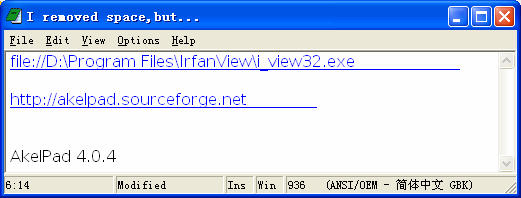
You can remove space from the URL delimiters.
Posted: Thu Sep 04, 2008 11:38 pm
by tireless
Instructor wrote:You can remove space from the URL delimiters.
into this?
<file://D:\ProgramFiles\IrfanView\i_view32.exe>,then how to open it?the real url is
D:\Program Files\IrfanView\i_view32.exe,not
D:\ProgramFiles\IrfanView\i_view32.exe.
Posted: Fri Sep 05, 2008 1:49 am
by Instructor
into this?
No. "Main Menu->Options->Settings...->Advanced (2)->Hyperlinks->Delimiters"
Posted: Fri Sep 05, 2008 1:49 am
by Sam_Zen
Of course a space char could be removed as a work-around, to get the full underlined link back.
But that's not the point. It's about interpretation.
I fully agree with the fact that 'Program Files' is a clumsy construction, also as a directory with a space character.
If I want to install IrfanView, I make my own survey, and probably install it in D:\graphtool\irfanview.
No path-problems whatsoever.
Posted: Fri Sep 05, 2008 11:17 am
by tireless
Posted: Fri Sep 05, 2008 11:24 am
by Instructor
tireless
If you want to use spaces in URL you must remove space from URL delimiters (as you did) and also enclose URL in delimiter characters (otherwise AkelEdit will don't know where URL ended). For example:
<file://d:\Program Files>
"file://d:\Program Files"
and so on.
Posted: Fri Sep 05, 2008 12:00 pm
by tireless
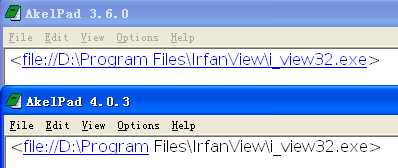
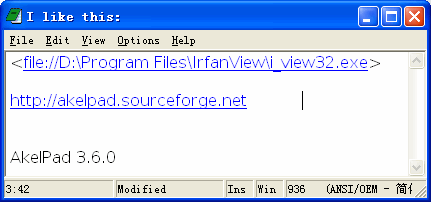
But why version 3.6.0 can do it together:
<
file://D:\Program Files\IrfanView\i_view32.exe>
http://akelpad.sourceforge.net test
file://D:\Program Files\IrfanView\i_view32.exe
version 4.0.4:
<
file://D:\Program Files\IrfanView\i_view32.exe>
http://akelpad.sourceforge.net test
file://D:\Program Files\IrfanView\i_view32.exe
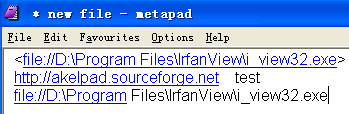
I also tried other notepad:metapad,same as AkelPad 3.6.0.
Posted: Fri Sep 05, 2008 12:11 pm
by FeyFre
tireless
As you can see
here (page18) file URL cannot contain space character, so I cannot understand where is problem here.
Posted: Sat Sep 06, 2008 1:52 am
by Sam_Zen
A workaround for this could be to replace the space character by "%20", before placing the URL :
<file://D:\Program%20Files\IrfanView\i_view32.exe>
Posted: Sat Sep 06, 2008 2:21 am
by ravenlaughs
No, I don't think so. It doesn't work for me, anyway.
I don't like to use the hyperlinks at all. I use a dark background, so the blue link is impossible to read.
Also, links to local files don't work for me. I can open a directory (in Windoze Explorer, ack) but not a file. It gets crossed up with other things I have installed. Yes, I have a weird system. I beat up on Windows.
Ask again:display "file path link"
Posted: Tue Oct 28, 2008 1:38 pm
by tireless
By default,file path with spaces will displayed like:
file://E:\Program Files\Opera\opera.exe
And I want it to this:
file://E:\Program Files\Opera\opera.exe
I know must remove space from the URL delimiters if I want that.But this will causes:
http://akelpad.sourceforge.net :(
I had
told that Version 3.60 displayed full (
screenshot).
Could you add an option "Characters Not Allowed at End",like the
EmEditor does: