Page 1 of 1

SmartMath Plugin - Real-time Calculations in AkelPad

Posted: Thu Apr 23, 2026 6:27 pm
by c-sanchez
SmartMath Plugin - Real-time Calculations in AkelPad

Hello everyone!
I would like to share a new plugin I've developed for AkelPad called SmartMath.

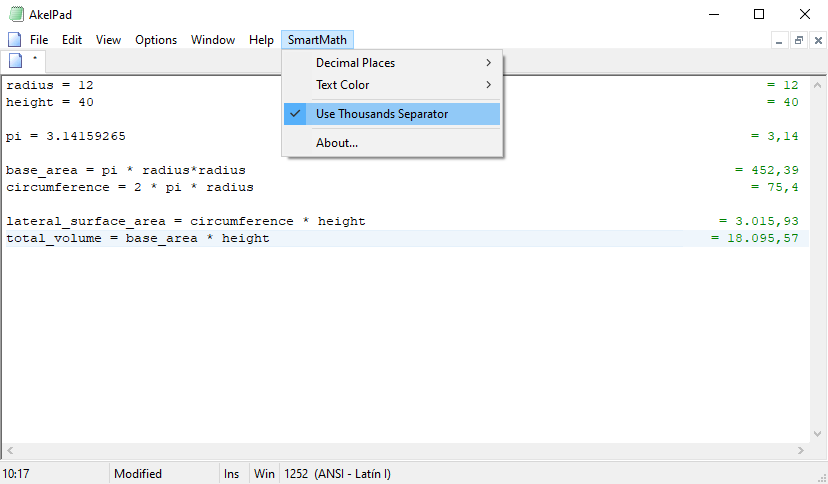
Inspired by tools like Soulver or Numara, SmartMath turns AkelPad into a dynamic, real-time calculator. It allows you to perform calculations naturally in plain text and shows the results instantly on the screen without altering your actual file content.
Image
Image
Image

✨ Key Features
  • Real-Time Evaluation: Instantly evaluates math operations as you type.
  • Non-Invasive Rendering: Results are drawn directly onto the screen margin using Windows GDI. Your document remains 100% untouched.
  • Variables in Memory: Define custom variables and reference them in subsequent lines.
  • Smart Percentages: Intuitive handling of the '%' character (e.g., 500 + 21% automatically yields 605).
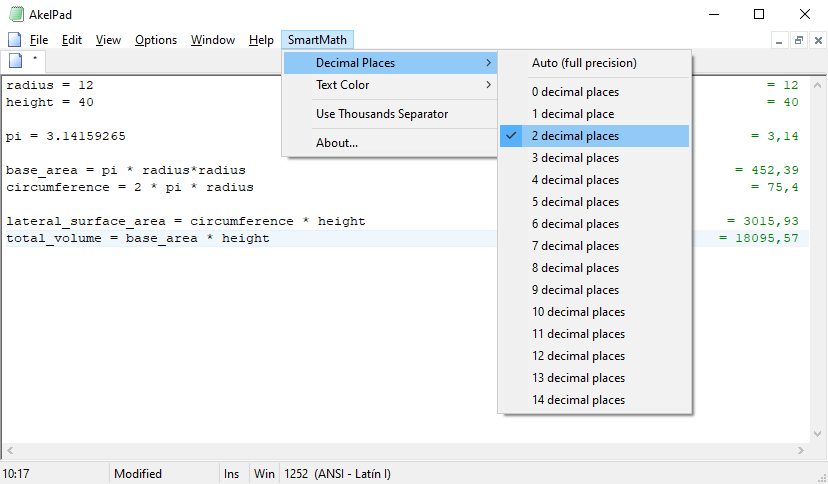
  • Advanced Formatting: Support for thousands separators and customizable precision (0 to 14 decimal places).
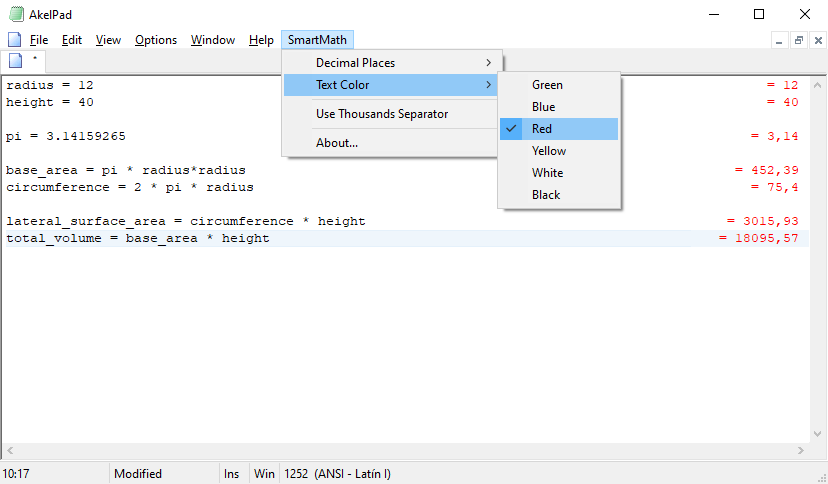
  • Aesthetic Customization: 6 different text colors available. It also seamlessly integrates with AkelPad's "Active Line" background highlight.
  • Native Architecture: Zero dependencies on external scripting engines. Compiles to highly optimized x86 and x64 native binaries.
πŸ’‘ Example Usage
You can type the following in your editor, and the results will automatically float in the right margin:

Code: Select all

BasePrice = 1500
Shipping = 45.50

Subtotal = BasePrice + Shipping
Taxes = Subtotal * 21%

FinalPrice = Subtotal + Taxes
βš™οΈ Installation
  1. Download the compiled DLL (choose x86 or x64 depending on your AkelPad version).
  2. Place SmartMath.dll inside your

    Code: Select all

    AkelFiles\Plugs\
    directory.
  3. Restart AkelPad.
  4. Go to Options -> Plugins (or press Alt+P), find

    Code: Select all

    SmartMath::ToggleSmartMath
    , check it to enable it, and set it to Autoload if you wish.
πŸ“₯ Downloads & Source Code
Download Latest Release
GitHub Repository (Source Code)

Any feedback, bug reports, or suggestions are highly appreciated!

Re: SmartMath Plugin - Real-time Calculations in AkelPad

Posted: Thu Apr 23, 2026 7:07 pm
by DV
What built-in functions are supported? E.g., trigonometric, logarithmic?
Are user-defined functions supported?
Ideally, it would be very cool to achieve functionality similar to https://speqmath.com/ (Well, maybe without plots, but with array operations similar to SpeQ).

Re: SmartMath Plugin - Real-time Calculations in AkelPad

Posted: Fri Apr 24, 2026 3:21 am
by c-sanchez
Hello! Thank you for your interest and for the feedback.

Currently, SmartMath does not support built-in functions (like trigonometric or logarithmic), user-defined functions, or array operations.

For this initial release, I have strictly limited the scope to:
  • Basic mathematical operations (+, -, *, /)
  • Custom variable assignments
  • The percentage operator ('%')
The main goal was to keep the plugin as lightweight, fast, and simple as possible for quick, everyday calculations (like invoices, budgets, or simple logic) without turning it into a heavy math suite.

Achieving something like SpeQ Math is a fantastic idea, but it would require a completely different and much more complex parsing engine. However, since the plugin is fully open-source, the door is always open! If the community is interested, those advanced math features could be explored in future updates, or anyone is welcome to fork the repository and contribute. :D

Re: SmartMath Plugin - Real-time Calculations in AkelPad

Posted: Fri Apr 24, 2026 6:51 am
by ewild
c-sanchez
Nice calculator, thank you.

The SmartMath resembles me OpalCalc, which is my nearly daily tool, and is also inspired by tools like Soulver. So this is a great idea to have a similar tool built into the AkelPad interface!

I've been making my own JavaScript-based MathText in-text calculator (not publicly released in its current form), and it was the only calculator for AkelPad that could do the percentage operations right, like:
80+50% = 120
80-50% = 40
80*50% = 40
80/50% = 160
As I can see, SmartMath can do it too, as intended; that's great!

One of my dreams is to make my calculator do in-text math with powers, in simple syntax like 2^2 = 4, 25^0.5 = 5 (at least, I've been trying to implement such a function).
It would be great if SmartMath could do it too!

With variable support (currently) and with power math support (in the future, I hope), your calculator will be exceptionally good in the role!

Doing math without changing the original text is a great idea (my calculator can do it too, directing its output into the Log plugin panel), but your approach is better since it keeps expressions and results in-line.
However, in SmartMath, I can see no option to insert the answer into the text (at least via the copy-paste method) if I explicitly want to do so.

One question, please.
How to create the SmartMath menu as it is seen in the screenshots on GitHub and here in the topic?
I can see no such thing in my AkelPad.
However, beyond the SmartMath entry, your menu looks like a vanilla one, while I use ContextMenu.dll and ToolBar.dll plugins, and maybe that tracks.
Since I cannot reach the SmartMath menu, I also don't have SmartMath.ini.
It would be great to have a SmartMath::Settings call to reach the settings, as most of the other plugins do.
And of course, a way to set the SmartMath menu up manually wherever a user prefers (in the main menu, submenus, context menus, batton bars...).

Thank you for the plugin one more time!
And I wish you the best of luck!

Re: SmartMath Plugin - Real-time Calculations in AkelPad

Posted: Fri Apr 24, 2026 4:36 pm
by DV
c-sanchez wrote: ↑Fri Apr 24, 2026 3:21 amAchieving something like SpeQ Math is a fantastic idea, but it would require a completely different and much more complex parsing engine.
However, since the plugin is fully open-source, the door is always open! If the community is interested, those advanced math features could be explored in future updates, or anyone is welcome to fork the repository and contribute. :D
Remember, it was you who suggested it! :)

You see, I don't really remember Basic and especially don't know FreeBasic which I've never learnt.
But!
Today we have a very nice AI-driven IDE named "Cursor".
So, I've opened your sources in Cursor IDE and asked to analyze the source code and then implement the following features:
1. support array-like parameters such as `a = (1, 2, 3); a*10`;
2. support parentheses such as `1 + 2*(3 + 4)`;
3. add trigonometric functions such as `sin`, `cos`, etc.
4. add logarithmic functions such as `log`, `exp`, etc.
5. add functions `sum`, `product`, `min` and `max` that accept variable number of arguments such as `sum(1,2,3)`;
6. add user-defined functions such as `f(x, y) = x*y`;
7. in case of syntax errors, report these errors to a user.

Here are the results so far:
https://github.com/d0vgan/AkelPad-Smart ... calculator

It is successfully compiled and seems to work.
I say "seems to work" because, as I mentioned, I don't really know FreeBasic, so there may be some flows or issues which I'm not aware of.

Even with these already amazing changes (just try them yourself!), it is still work-in-progress, because:
1) I would like to add support of input hex numbers in a form of `0x7FFF`;
2) I would like to add a function `hex` that will print the result as a hex number;
3) the error reporting needs to be carefully inspected and improved (basing on user's feedback);
4) more to go :)

I hope you like these changes!

Re: SmartMath Plugin - Real-time Calculations in AkelPad

Posted: Fri Apr 24, 2026 5:20 pm
by DV
One screenshot is better than a thousand words :)
Image

Re: SmartMath Plugin - Real-time Calculations in AkelPad

Posted: Sat Apr 25, 2026 2:57 am
by c-sanchez
ewild wrote: ↑Fri Apr 24, 2026 6:51 am Nice calculator, thank you.

The SmartMath resembles me OpalCalc, which is my nearly daily tool, and is also inspired by tools like Soulver. So this is a great idea to have a similar tool built into the AkelPad interface!
Cheers! I'm glad you like it :D
I liked OpalCalc, although I wanted something that didn't require .NET, Java, Python, etc. β€” something as purist/native to the system as possible.
At the time, I thought about making my own calculator, but after seeing that making a plugin was a viable option, I decided to go down this route. That way, we have all the features / plugins / scripts available in AkelPad :D
ewild wrote: ↑Fri Apr 24, 2026 6:51 am I've been making my own JavaScript-based MathText in-text calculator (not publicly released in its current form), and it was the only calculator for AkelPad that could do the percentage operations right, like:
80+50% = 120
80-50% = 40
80*50% = 40
80/50% = 160
As I can see, SmartMath can do it too, as intended; that's great!
This is one of those things that, even though it's really "silly", I thought was essential to have :lol:
I'm glad to hear you like it too :D
ewild wrote: ↑Fri Apr 24, 2026 6:51 am Doing math without changing the original text is a great idea (my calculator can do it too, directing its output into the Log plugin panel), but your approach is better since it keeps expressions and results in-line.
However, in SmartMath, I can see no option to insert the answer into the text (at least via the copy-paste method) if I explicitly want to do so.
This would actually be something really useful; I'd thought about adding a context menu for the results section, like "Copy Results" or "Copy Operation & Results", but I wanted to get the plugin finished already, sorry ;p
But maybe assigning an operation to a variable and using that would be enough?
ewild wrote: ↑Fri Apr 24, 2026 6:51 am One question, please.
How to create the SmartMath menu as it is seen in the screenshots on GitHub and here in the topic?
I can see no such thing in my AkelPad.
However, beyond the SmartMath entry, your menu looks like a vanilla one, while I use ContextMenu.dll and ToolBar.dll plugins, and maybe that tracks.
Since I cannot reach the SmartMath menu, I also don't have SmartMath.ini.
It would be great to have a SmartMath::Settings call to reach the settings, as most of the other plugins do.
And of course, a way to set the SmartMath menu up manually wherever a user prefers (in the main menu, submenus, context menus, batton bars...).
That's weird, when you activate SmartMath, it doesn't show up in your AkelPad top menu?
Although that's another little thing I thought about at the endβ€”that maybe the menu should be more "global"β€”but thinking about how the other plugins work and all that was something I didn't want to pursue, so I ended up leaving it with the native menu. Like I said, I just wanted to get the plugin finished already :lol:

Anyway, I think DV knows all those bits I missed much better, especially for improving the integration with AkelPad and other plugins, and he's been making incredible improvements in a very short time, so maybe he'll fix all the stuff I missed :)
DV wrote: ↑Fri Apr 24, 2026 4:36 pm Remember, it was you who suggested it! :)
Haha, definitely! I'm really glad to see a fork making everything better :D
DV wrote: ↑Fri Apr 24, 2026 4:36 pm You see, I don't really remember Basic and especially don't know FreeBasic which I've never learnt.
But!
Today we have a very nice AI-driven IDE named "Cursor".
So, I've opened your sources in Cursor IDE and asked to analyze the source code and then implement the following features:
1. support array-like parameters such as `a = (1, 2, 3); a*10`;
2. support parentheses such as `1 + 2*(3 + 4)`;
3. add trigonometric functions such as `sin`, `cos`, etc.
4. add logarithmic functions such as `log`, `exp`, etc.
5. add functions `sum`, `product`, `min` and `max` that accept variable number of arguments such as `sum(1,2,3)`;
6. add user-defined functions such as `f(x, y) = x*y`;
7. in case of syntax errors, report these errors to a user.
Wow, I'm surprised how many new things you've added in such a short time; it took me much longer to polish every little bit haha :shock:
To be honest, I admit I built the plugin using Gemini via AI Studio, so I'm fine with you using Cursor either way; in the end, all that matters is that we check everything's working as it should :)
The hardest part for me was getting the results on the right-hand side of the editor and fixing some rendering/syncing issues with the font size. After that, everything was much easier, so I'm glad to at least leave a useful foundation :)
DV wrote: ↑Fri Apr 24, 2026 4:36 pm Here are the results so far:
https://github.com/d0vgan/AkelPad-Smart ... calculator
Brilliant! I'm going to enjoy trying it out later :D
DV wrote: ↑Fri Apr 24, 2026 4:36 pm It is successfully compiled and seems to work.
I say "seems to work" because, as I mentioned, I don't really know FreeBasic, so there may be some flows or issues which I'm not aware of.

Even with these already amazing changes (just try them yourself!), it is still work-in-progress, because:
1) I would like to add support of input hex numbers in a form of `0x7FFF`;
2) I would like to add a function `hex` that will print the result as a hex number;
3) the error reporting needs to be carefully inspected and improved (basing on user's feedback);
4) more to go :)
To be honest, when I finished the plugin I was thinking something like "I like it, but this still can't quite replace the system calculator yet", for instance because of the lack of trigonometric and logarithmic functions, but with your changes that's completely different.
Support for hex numbers seems like another brilliant idea!
I'm excited to see what new features you'll be adding soon; could you include ewild's ideas as well?
DV wrote: ↑Fri Apr 24, 2026 4:36 pm I hope you like these changes!
Absolutely! :mrgreen:

Re: SmartMath Plugin - Real-time Calculations in AkelPad

Posted: Sat Apr 25, 2026 8:05 pm
by DV
The progress so far:
Image

Re: SmartMath Plugin - Real-time Calculations in AkelPad

Posted: Sat Apr 25, 2026 8:29 pm
by DV

Re: SmartMath Plugin - Real-time Calculations in AkelPad

Posted: Sun Apr 26, 2026 2:12 am
by c-sanchez
Wow, you're really making the plugin "Smart" haha
Btw, feel free to modify the "About" window too, include all the new features and your name as lead developer :)
I was going to mention that it would be great to have comments, but you've already done it haha

I'm really happy with how the plugin has evolved and to see that you're enjoying it too.
Also, I'm glad I've managed to get another user for FreeBASIC hehe, I was planning to post the plugin on the FreeBASIC forum but I forgot, if you like you can join the forum as well :)

Re: SmartMath Plugin - Real-time Calculations in AkelPad

Posted: Sun Apr 26, 2026 8:43 am
by ewild
DV
In the original c-sanchez's version, when SmartMath meets a line like this

Code: Select all

5*5 = 25 
it does nothing, i.e., ignores a line that looks like a resolved 'expression = result', which is pretty reasonable.
However, in your fork, SmartMath would throw an '! unexpected token...' error wherever it sees an equal sign outside of the variable assignment expressions. The same occurs with a lot of other, to say of 'dual-purpose', symbols.
As I understand, this is related to the diagnostics in the description:
If you need to diagnose a crash or a problematic input line, you can enable per-line parser logging in SmartMath.ini.
SmartMath.ini ([Settings] section):
LogParsedLines=1
Notes:
LogParsedLines=0 disables this logging (default).
So I've made it manually to force the debugging off; however, it seems to have no effect.

Code: Select all

SmartMath.ini
[Settings]
LogParsedLines=1
Also, since my AkalPad is in the save-settings-in-the-registry mode, I put SmartMath settings in the registry as well (even though I'm not sure if SmartMath currently can use the in-registry settings at all), as the other plug-ins do it:

Code: Select all

[HKEY_CURRENT_USER\SOFTWARE\Akelsoft\AkelPad\Plugs\SmartMath]
"LogParsedLines"=dword:00000000
Then I switched AkelPad ini-registry settings back and forth to no avail.
So it looks like SmartMath's diagnostic mode is currently hardcoded to be always on and cannot be turned off in the settings.

Re: SmartMath Plugin - Real-time Calculations in AkelPad

Posted: Sun Apr 26, 2026 10:04 am
by DV
ewild wrote: ↑Sun Apr 26, 2026 8:43 am

Code: Select all

5*5 = 25 
What you see here is the error reported by the parser/evaluator.
Currently there are no comparison operators supported, so the presence of `=` is an occurrence of an unsupported operators.
If we want, we may add comparison operators such as `=`, `>=`, `<` etc. Do we really need them?

As for the "LogParsedLines" option, this one is really for troubleshooting. For example, when AkelPad crashes because of the parser.
With "LogParsedLines=1", each parsed line is sent to `OutputDebugString` which can be seen in DbgView from SysInternals.

Re: SmartMath Plugin - Real-time Calculations in AkelPad

Posted: Sun Apr 26, 2026 12:15 pm
by DV
Actually, since SmartMath is so powerful that it widely deals with array arguments, the comparison operations make sense.
They have been added together with the logical operators.
Yep, the power of AI-driven development :)
And don't think that the speed of the development means low quality. On the contrary, each change is covered by new smoke tests which are also written by AI :)