Page 1 of 1
Coding
Posted: Sat Jun 05, 2021 2:00 pm
by sexy96
For example, I have 2 files: plik1.txt and plik2.txt: ISO 8859-2
plik1.txt opens as OEM - Latin II
plik2.txt opens as ANSI
I'd like to run both from Toolbar
"Open 2 x txt" Call("Scripts::Main", 1, "EvalCmd.js", `0x1; AkelPad.OpenFile("D:\Work\plik1.txt"); AkelPad.OpenFile("D:\Work\plik2.txt"); `) Icon("")
What command to type to make both open in: ISO 8859-2?
Re: Coding
Posted: Sun Jun 06, 2021 5:17 pm
by DV
According to "AkelPad\AkelFiles\Docs\Scripts-Eng.txt" :
Code: Select all
OpenFile(pFile[, nFlags][, nCodePage][, bBOM]);
You can specify 0x03 as the value of nFlags.
And specify the desired encoding as the value of nCodePage.
For example:
Code: Select all
AkelPad.OpenFile("D:\\Work\\plik1.txt", 0x03, 28592);
Posted: Sun Jun 06, 2021 8:21 pm
by sexy96
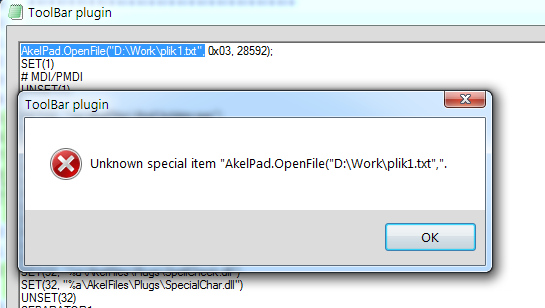
AkelPad.OpenFile("D:\Work\plik1.txt", 0x03, 28592);
Or
AkelPad.OpenFile("D:\Work\plik1.txt", 0x03, 8859-2);
Such a command cannot be written to the Toolbar
Posted: Mon Jun 07, 2021 9:01 am
by DV
This works for me:
Code: Select all
"Open txt" Call("Scripts::Main", 1, "EvalCmd.js", `AkelPad.OpenFile("AkelFiles\\Docs\\Toolbar-Eng.txt", 0x01, 28592);`) Icon("")
Posted: Mon Jun 07, 2021 9:24 am
by DV
As for Toolbar's own commands, the "AkelFiles\Docs\Toolbar-Eng.txt" says:
Code: Select all
OpenFile("file"[, OpenCodepage][, OpenBOM])
So it is just "OpenFile" for Toolbar, instead of "AkelPad.OpenFile" for Scripts, and the codepage is 2nd parameter for Toolbar, instead of 3rd parameter for Scripts.
Posted: Mon Jun 07, 2021 4:07 pm
by sexy96
Thanks, it works great ...
but what command to type to run 2 or more text files
such a record does not work:
"Open txt" Call("Scripts::Main", 1, "EvalCmd.js", `AkelPad.OpenFile("D:\\plik1.txt", 0x01, 28592); `AkelPad.OpenFile("D:\\plik2.txt", 0x01, 28592)) Icon("")
Posted: Tue Jun 08, 2021 11:55 am
by opk44
sexy96 wrote:such a record does not work:
"Open txt" Call("Scripts::Main", 1, "EvalCmd.js", `AkelPad.OpenFile("D:\\plik1.txt", 0x01, 28592); `AkelPad.OpenFile("D:\\plik2.txt", 0x01, 28592)) Icon("")
Check second grave accent sign ("`") place. Compare it with your first example.
Posted: Tue Jun 08, 2021 2:16 pm
by sexy96
I tried like this:
"Open txt" Call("Scripts::Main", 1, "EvalCmd.js", `AkelPad.OpenFile("D:\\plik1.txt", 0x01, 28592); `AkelPad.OpenFile("D:\\plik2.txt", 0x01, 28592);`) Icon("")
and this way:
"Open txt" Call("Scripts::Main", 1, "EvalCmd.js", `AkelPad.OpenFile("D:\\plik1.txt", 0x01, 28592);` `AkelPad.OpenFile("D:\\plik2.txt", 0x01, 28592);`) Icon("")
this information appears:
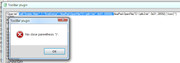
the number of parentheses is even, so... why?
Posted: Tue Jun 08, 2021 4:15 pm
by opk44
sexy96 wrote:I tried like this:
"Open txt" Call("Scripts::Main", 1, "EvalCmd.js", `AkelPad.OpenFile("D:\\plik1.txt", 0x01, 28592); `AkelPad.OpenFile("D:\\plik2.txt", 0x01, 28592);`) Icon("")
and this way:
"Open txt" Call("Scripts::Main", 1, "EvalCmd.js", `AkelPad.OpenFile("D:\\plik1.txt", 0x01, 28592);` `AkelPad.OpenFile("D:\\plik2.txt", 0x01, 28592);`) Icon("")
...
the number of parentheses is even, so... why?
I see three and four grave accent quotes.
Remove extra grave accent quotes in the middle, leave only two (2) along the edges, not three (3), not four (4) and do not fool your head.
Posted: Tue Jun 08, 2021 6:32 pm
by sexy96
Thanks, it helped.
And the last problem ...
Favorites> Manage ...
D:\file.txt
always opens in ANSI.
Can you also force an opening in ISO here?