Page 1 of 1
An automatic uppercase option available in .coder files?
Posted: Mon Jan 22, 2018 9:39 pm
by CBruce
I like to use uppercase keywords in VB and PowerBasic. Are there flags or options that I can set in .coder files to force keywords to be automatically uppercased?
Thanks,
CBruce
Posted: Tue Jan 30, 2018 8:23 pm
by CBruce
Note... Autocompletion is not what I'm looking for.
Autocompletion is good if you are looking for the correct spelling of the keyword that you are trying to enter... and if you select the correct keyword, it does insert it as uppercase.
But Autocompletion is actually very distracting if you know what you are typing.
Being forced to hit [tab] or [enter] on every keyword, just to get the keyword to uppercase, is not a solution for me.
That's why I am wondering if there is an option somewhere in the .coder properties that will just automatically uppercase the keywords as I type them in?
I've entered all of the keywords in uppercase in the .coder file - and although they get the correct color formatting, they do not display in uppercase like they are in the .coder file.
Thanks!
CBruce
Posted: Wed Jan 31, 2018 12:48 am
by Skif_off
CBruce
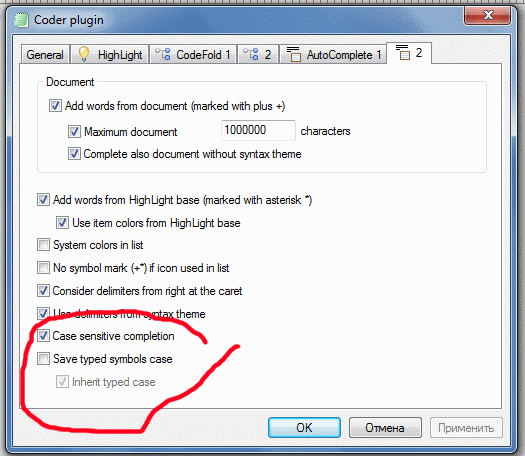
Have you tried using
this Coder plugin options?
Posted: Wed Jan 31, 2018 3:38 am
by CBruce
Skif_off
I just made sure again.
I tried each of those three settings, in all (possible) combinations:
Code: Select all
Case    : Y Y Y N N
Save    : N Y Y Y Y
Inherit : N N Y N Y
I exited after each setting and then relaunched AkelPad.
It still does not uppercase any of my keywords.
Posted: Wed Jan 31, 2018 4:21 am
by Skif_off
CBruce
Not "all (possible) combinations":
Posted: Wed Jan 31, 2018 4:58 am
by CBruce
Skif_off
Oops! That combination is the way the settings were when I started. I forgot to mark it down as I was testing. Good catch!
Posted: Wed Jan 31, 2018 3:33 pm
by Instructor
CBruce
CapsLock?

Posted: Wed Jan 31, 2018 5:22 pm
by CBruce
THANKS,
Instructor!
That's a LOT easier....
I've been using the Shift key.