Page 1 of 2
Problem z RegExp
Posted: Sat Nov 19, 2016 2:58 pm
by sexy96
2+5-7=0
To jest OK.
[+][0-9]
[+]\d
a to nie działa
"Błąd składni (2)"
[-][0-9]
[-]\d
Jak powinno być to poprawnie napisane?
Posted: Sat Nov 19, 2016 3:20 pm
by opk44
sexy96
1)
-[0-9]
-\d
2)
[\-][0-9]
[\-]\d
Posted: Sat Nov 19, 2016 3:26 pm
by sexy96
Thanks. This is it.
Problem z RegExp.
Posted: Mon Nov 21, 2016 9:21 am
by sexy96
Chcę poszukać wyrazy, w których druga litera jest: b
W tym przykładzie jest obok
"dwóch jedynek, obok siebie"
Ten zapis nie działa: (\b .b)
gdy przed nim są w tekście znaki :,.';"
Jak powinien wyglądać poprawny zapis?
W Google'u nie mogę tego znaleźć.
Posted: Mon Nov 21, 2016 10:22 am
by opk44
sexy96
1. English?
2. (\b .b) --> (\b.b)
Posted: Mon Nov 21, 2016 10:31 am
by sexy96
Thanks, now is fine.
RegExp problem.
Posted: Tue Nov 22, 2016 8:43 am
by sexy96
I want to find words in which the second letter is "c"
Tester:
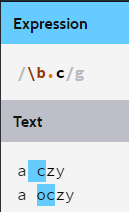
here False
Posted: Tue Nov 22, 2016 9:06 am
by FeyFre
\b-word boundary
\w-word character
PS: looks like regex 101 fails to recognize "ę"as single char (it is seen as e + diacritic codepoint so it fail to recognize it as non-delimiter). Well, you should find out what is official position of regex implementors/standards.
Posted: Tue Nov 22, 2016 9:24 am
by sexy96
Now is good. Thanks
RegExp problem.
Posted: Tue Nov 22, 2016 5:07 pm
by sexy96
linia$(1) = "[Buttonbar]": linia$(2) = TextLinii$(2)
ReDim Preserve TextLinii$(nn%)
Buttoncount = Right(TextLinii$, Len(TextLinii$ - 2))
2+3
Buttoncount = Right(TextLinii$, Len(TextLinii$ - 2))
Kod: .*= Right\(.*Len\(.*
https://regex101.com
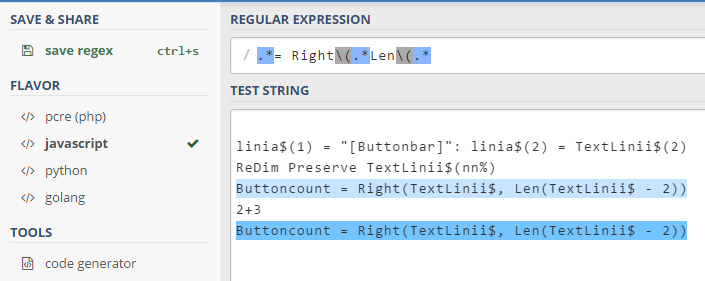
AkelPad:
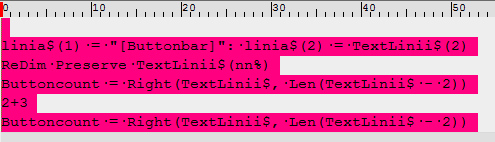
Why the difference?
Posted: Tue Nov 22, 2016 6:25 pm
by opk44
sexy96
Symbol "dot" (.) in AkelPad can be interpreted in two ways: "
dot '.' matches any single character (default)" or "
dot '.' matches any single character, except newline character".
See "AkelHelp-Eng.htm" --> "Regular expression syntax" --> (?options):
(?s) dot '.' matches any single character (default).
(?-s) dot '.' matches any single character, except newline character.
You can use that option "directly" in expression or you can check it in form "Find" (look at the small triangle to the right of option "[ ] Regular expressions ▼")
The second way is to use script "FindReplaceEx.js". It is most similar to "regex101.com"
Posted: Tue Nov 22, 2016 6:35 pm
by sexy96
I switched off: .matches \ n
Now is OK. Thanks
RegExp problem.
Posted: Sat Nov 26, 2016 1:05 pm
by sexy96
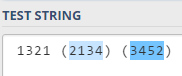
I would look "only" the number contained in parentheses
without marking the brackets.
I know it does not matter, but if it can be done?
Posted: Sat Nov 26, 2016 2:13 pm
by KDJ
sexy96
Use
TextMarker.js script with regular expression:
Posted: Sat Nov 26, 2016 2:24 pm
by sexy96
Dzięki.