XBrackets v.7.9
- исправлено: при вставке текста в только что созданный документ (сразу после Файл -> Новый), скобки не подсвечивались пока окно редактирования не теряло фокус и не получало фокус опять
XBrackets plugin
- Author
- Message
-
Offline
- Posts: 1267
- Joined: Thu Nov 16, 2006 11:53 am
- Location: Kyiv, Ukraine
Re: XBrackets plugin
XBrackets 8.0
+ добавлено: расширенная настройка для "Считать ' ' парой скобок"
- исправлено: функция GetNearestBracketsRange не учитывала, что вызов NearestBr_GetFoldOrQuoteFromAkelEdit может вернуть не ту пару скобок
+ добавлено: расширенная настройка для "Считать ' ' парой скобок"
- исправлено: функция GetNearestBracketsRange не учитывала, что вызов NearestBr_GetFoldOrQuoteFromAkelEdit может вернуть не ту пару скобок
-
Offline
- Posts: 1267
- Joined: Thu Nov 16, 2006 11:53 am
- Location: Kyiv, Ukraine
Re: XBrackets plugin
XBrackets v.8.1
+ добавлено: gotobr.lines_vis_up, gotobr.lines_vis_down и gotobr.pair_line_diff
- исправлено: убрано мигание подсвеченных скобок при закрытии AkelPad
+ добавлено: gotobr.lines_vis_up, gotobr.lines_vis_down и gotobr.pair_line_diff
- исправлено: убрано мигание подсвеченных скобок при закрытии AkelPad
-
Offline
- Posts: 154
- Joined: Fri Aug 15, 2008 8:58 am
Re: XBrackets plugin
This plugin not support JSON files?
-
Offline
- Posts: 26
- Joined: Sat Jul 05, 2008 11:30 am
- Location: Odesa, Ukraine
Re: XBrackets plugin
This plugin does support .json files.
However, you might prefer to uncheck "In visible area only" check box in the plugin's settings; otherwise, the plugin won't highlight bracket pairs if only one of them is visible (while the other is out of the screen), which may pretty often occur in case of the .json files.

-
Offline
- Posts: 154
- Joined: Fri Aug 15, 2008 8:58 am
Re: XBrackets plugin
Currently, calling Call("XBrackets::SelToMatchingBracket") selects only the body of the function, excluding the signature/header.
It would be very useful if this command could be extended (or have an option) to select the entire function, including:
- the function signature (return type, name, parameters, qualifiers, etc.)
- the opening brace
- the full body
- the closing brace
This would make it easier to move, copy, or refactor whole functions in one step.
Is this behavior intentional, or could it be adjusted/extended in a future release?
It would be very useful if this command could be extended (or have an option) to select the entire function, including:
- the function signature (return type, name, parameters, qualifiers, etc.)
- the opening brace
- the full body
- the closing brace
This would make it easier to move, copy, or refactor whole functions in one step.
Is this behavior intentional, or could it be adjusted/extended in a future release?
-
Offline
- Posts: 1267
- Joined: Thu Nov 16, 2006 11:53 am
- Location: Kyiv, Ukraine
Re: XBrackets plugin
With the optionDiamen wrote: Sat Sep 05, 2026 5:55 am Currently, calling Call("XBrackets::SelToMatchingBracket") selects only the body of the function, excluding the signature/header.
Code: Select all
nearestbr.selto_flags=2The plugin does not have any knowledge about signatures/headers.
Maybe such context could be requested from the Coder plugin - such as "if the brackets/braces around the function body are already selected, then try to ask Coder about the file syntax-specific beginning and end of the function", I'm not sure.
-
Offline
- Posts: 154
- Joined: Fri Aug 15, 2008 8:58 am
Re: XBrackets plugin
When I repeat SelToNearestBrackets, the selection remains unchanged. Only the cursor position changes, moving to either the beginning or the end of the selection.
I every have to delete selection, select signature and delete selection again.
-
Offline
- Posts: 1267
- Joined: Thu Nov 16, 2006 11:53 am
- Location: Kyiv, Ukraine
Re: XBrackets plugin
Actually, isn't this what you want? --Diamen wrote: Sun Sep 06, 2026 5:54 pmI every have to delete selection, select signature and delete selection again.
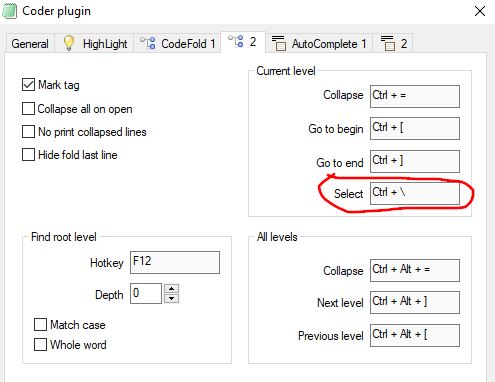
-
Offline
- Posts: 154
- Joined: Fri Aug 15, 2008 8:58 am
Re: XBrackets plugin
I disabled XBrackets and now select signature as you say (also if not select tab in signature :/).
Do it is possible to toggle CurrentGoBegin CurrentGoEnd with Coder as XBrackets?
Coder have any function that XBrackets has?
Do it is possible to toggle CurrentGoBegin CurrentGoEnd with Coder as XBrackets?
Coder have any function that XBrackets has?
-
Offline
- Posts: 1267
- Joined: Thu Nov 16, 2006 11:53 am
- Location: Kyiv, Ukraine
Re: XBrackets plugin
I don't understand your question exactly, so I'm trying to answer what I believe is related.
XBrackets and Coder are different plugins with different purpose. What is more important, Coder has its own key bindings in its Settings window, and XBrackets allow to specify key bindings in the Plugins window. Thus, nothing forbids to use these two plugins in parallel.
Coder works with file syntax - in fact, it parses a document using a file syntax. So, Coder is aware of function signature and blocks of code.
XBrackets does not know anything about file syntax. My primary usage of XBrackets is:
- Brackets (and quotes) auto-completion: when you type an opening bracket or quote, a closing one is automatically added.
- Selecting a string within quotes - e.g. "some string" - via SelToNearestBrackets. Coder can't do that since it operates with function blocks, and quotes are not function blocks.
- Selecting an expression in brackets - e.g. (a+b+c) - and a section name - e.g. [section name]. Coder can't do that since it operates with function blocks, and text within round/square brackets is not a function block.
- Jumping between the starting and ending quote or bracket. Coder can't do that unless we are talking about { } that specify a function block.
Now, to confuse you, I should add that XBrackets actually communicates with Coder when Coder is active.
Why? Because different file syntax rules may create confusions in identifying of which exact opening bracket or quote matches which exact closing bracket or quote.
Consider the following text: { " } { " }. When you look at this text from the beginning to the end, it's obvious what bracket and quote corresponds to what. But if the caret is at the very trailing closing brace and you want XBrackets to find the matching opening one, it may mistakenly find the one inside the quotes because, unlike Coder, XBrackets does not parse the file from the very beginning to the very end.
That's why XBrackets first asks Coder: does the bracket/quote under the caret have the pairing bracket/quote that you are aware of? And if Coder confirms the pairing character, XBrackets uses that information for jumping or selecting between the brackets/quotes. If Coder does not have such information, then XBrackets parses the text until the very first character that seems to be a pairing one. So XBrackets parses only small part of the file, and takes into account only brackets and quotes, nothing else.
-
Offline
- Posts: 154
- Joined: Fri Aug 15, 2008 8:58 am
Re: XBrackets plugin
Ty for explanation.
I now use
CTRL-B : Call("Scripts::Main",1,"my.js","-js=braket")
CTRL-SHIFT-B : Call("Coder::CodeFold::CurrentSelect")
Find root level hotkey nothing do.
I now use
CTRL-B : Call("Scripts::Main",1,"my.js","-js=braket")
CTRL-SHIFT-B : Call("Coder::CodeFold::CurrentSelect")
Code: Select all
function Braket(){
/*
    if ((oSys.Call("User32::GetAsyncKeyState", 0x10))){// && (oSys.Call("User32::GetAsyncKeyState", 0x11))
        AkelPad.Call("Coder::CodeFold::CurrentSelect")
        return;
    }
*/
    var pos = AkelPad.GetSelStart(), text = AkelPad.GetTextRange(0, -1), a = pos > 0 ? AkelPad.GetTextRange(pos - 1, pos) : "", b = pos < text.length ? AkelPad.GetTextRange(pos, pos + 1) : "", ch="{}[]()\"'";
    if(ch.indexOf(a)!==-1 || ch.indexOf(b)!==-1){
        AkelPad.Call("XBrackets::GoToMatchingBracket");
    }else{
        AkelPad.Call("Coder::CodeFold::CurrentGoBegin")
    }
}